Handrite Notes Notepad Pro APK, per prendere le note a mano libera su Android
Download Handrite Notes Notepad Pro APK, per prendere le note a mano libera su AndroidSenza dubbio il principale punto di forza del Galaxy Note 2 è rappresentato dalla sua pennina S Pen, che si integr...
 Riccardo Conti

Download Handrite Notes Notepad Pro APK, per prendere le note a mano libera su Android

Senza dubbio il principale punto di forza del Galaxy Note 2 è rappresentato dalla sua pennina S Pen, che si integra al meglio con tutto il sistema operativo e, in particolare, con il software S Note.
Questo programma di Samsung permette all'utente di prendere comodamente note e appunti con la S Pen a mano libera sullo smartphone e sul tablet di Samsung.
Ma esiste un'alternativa a Samsung S Note per tutti gli altri dispositivi Android?
Si, esiste e si chiama Handrite Notes Notepad Pro. Questo programma, infatti, è simile in tutto e per tutto al programma S Note di Samsung e permette di prendere appunti e note a mano libera sui nostri dispositivi Android, sia smartphone che tablet.
Non sarà esattamente la stessa cosa, visto che non avremo la S Pen, ma avremo comunque la possibilità di prendere note e appunti a mano libera su Android in modo facile, veloce e immediato.
Handrite Notes Notepad Pro è un programma davvero completo che permette di gestire le nostre note in modo intuitivo e rapido.
Handrite Notes Notepad Pro, inoltre, offre all'utente svariati tipi di carta virtuale sulla quale scrivere e prendere appunti in caso di necessità.
A mio avviso questo Handrite Notes Notepad Pro è un tool davvero utile per prendere appunti e note su Android. Assolutamente consigliato a tutti.
Users of free versions can use only 3 notebooks. Please support our work by buying pro !
Handrite Notes Notepad Pro
It's the write idea. Handrite alows you to write with your finger right on your screen. Each time you lift your finger, the character or symbol you wrote appears in the notebook interface. It replicates exactly what you add to the screen. Give up the apper habit and keep, send, or post your notes.
You're in an important meeting or lecture when suddenly you realize--you forgot your pen or notebook! Or you're at a party and need to take down a phone number or an e-mail address. Don't trust your memory or try to scribble on a dry-cleaning receipt; Handrite is the solution you need.
The Write Move
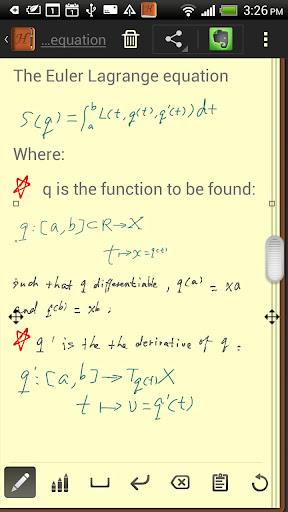
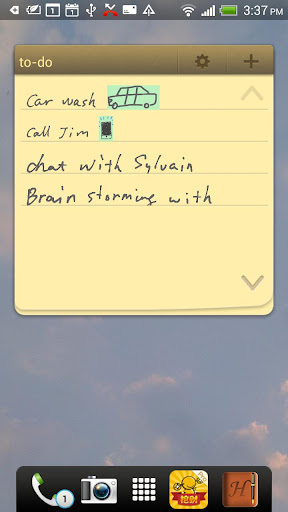
Rather than trying to frantically type notes on your device keyboard, Handrite Note allows you to write with your finger right on your Android's screen. Each time you lift your finger, the character or symbol you wrote appears in the notebook interface. When you finish a word, just hit the space bar icon at the bottom of the screen. Hit Return if you want to move down to the next line. If you make a mistake, there's a simple backspace button to delete as many characters as you need to. You can also cut and paste with ease.
Handrite Note doesn't try to "read" your handwriting. Rather, it replicates exactly what you trace on the screen, as with a drawing program. This avoids the pain of having to "train" the app to read your writing, and the inevitable mistakes that occur. It also means you can sketch symbols, numbers, pictures, mathematical equations--whatever you write is instantly recorded digitally for later reference. And notes are saved automatically.
Right at Hand
You know how it goes: you write something down on a slip of paper or pad, then misplace it or don't have it when you need it. Now you can have your notes with you at all times, whether you're on the beach or in the boardroom. The app's time stamp and labeling system allows you categorize, sort, and find your notes quickly and easily.
You can also export your notes with a few taps on the screen. Whether you want to save it to your SD card, send it to yourself or someone else in e-mail, tweet it, post it to Facebook, or another sharing method, a note doesn't have to remain tethered to your Android device. Export in either JPEG or PNG format.
Function and Form
Unlike many notepad applications, Handrite Note allows you to write in style. Create and save different types of "pens," adjusting line thickness and color to fit your needs. Then swap them in and out when needed. You can also choose from 14 different styles of "paper," including beautiful solid hues, notebook lines, and even graph paper. The size of your text and spacing are also adjustable, so you can customize them for easy readability. Make the right choice with Handrite Note for Android.
What's in this version : (Updated : Mar 1, 2013)
- Bug fix: FC when setting orientation to "Landscape" and system auto rotate disabled.
- Bug fix: No item found in Gallery in some of the devices, causes impossible to insert picture attachment.
Required Android O/S : 1.6+
Screenshots :
Download : 1.2Mb APK
Download Handrite Notes Notepad Pro v1.85 APK Android
👉 Iscriviti al canale WhatsApp di YourLifeUpdated
Ricevi solo le notizie e le guide più importanti, senza spam.
Hai bisogno di aiuto o consigli rapidi?
💬 Supporto diretto: entra nel gruppo Telegram – CLICCA QUI
👥 In alternativa, unisciti al nostro Gruppo Facebook
🔥 Le migliori offerte tech, ogni giorno
💰 Unisciti al gruppo OFFERTE TECH (oltre 16.000 utenti)
Seleziono solo offerte davvero convenienti per farti risparmiare tempo e denaro.
Seguici anche qui:
📰 Google News o Facebook – per non perdere nessuna novità
🎥 YouTube – recensioni oneste, test e guide pratiche
💡 Vuoi risparmiare su Amazon?
🚀 Prova Amazon Prime gratis oppure
🛒 scopri le migliori offerte Amazon di oggi