Infinite Painter v2.3.1 APK, dipingi con il tuo Android
Download Infinite Painter v2.3.1 APK, dipingi con il tuo AndroidImagine. Create. Experience the natural artistic environment of Infinite Painter !Infinite Painter play.google.com.painterfullInfinite P...
 Riccardo Conti
Download Infinite Painter v2.3.1 APK, dipingi con il tuo Android

Imagine. Create. Experience the natural artistic environment of Infinite Painter !
Infinite Painter play.google.com.painterfull
Infinite Painter è un bel programma da disegno per Android.
Vi permette di trasformare il vostro smartphone o tablet Android in una tavola da disegno, con tante funzioni avanzate che nemmeno un pittore professionista ha sempre a portata di mano.
Avrete la possibilità di creare dei fantastici dipinti, con tutti gli accessori e gli strumenti di cui avete bisogno per realizzare capolavori veri e propri.
L'unico limite sarà la vostra fantasia!
DESCRIZIONE E DOWNLOAD
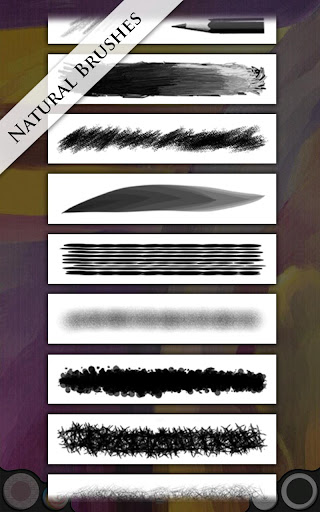
This app offers a multitude of brushes designed to replicate realistic mediums. It offers a variety of features built to optimize and streamline the workflow of the artist. It works well with Infinite Design, allowing the user to export their projects from Infinite Design into Infinite Painter with the click of a button.
It has five different types of symmetries you can use (X-Axis, Y-Axis, Arbitrary Angle, Radial, and Kaleidoscopic). It utilizes a smart menu system and a fluid interface, seeking to make work flow on the go much easier.
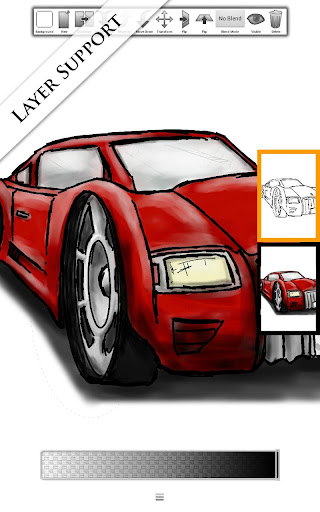
Navigation is as easy as putting two fingers on the screen and dragging the canvas or pinching to zoom. The auto save feature also comes in handy, automatically saving your layers and reloading them when you return. You can save your project, and all of your layers stay intact. You can also export your image with or without the background.
Besides these fundamental necessities, Infinite Painter also offers image importing in four different ways (Camera, Gallery, Google Image Search, and the current painting itself). After importing an image, you can translate, re-size, rotate, flip or recolor it to your liking. You then have the option to either stamp or rub the image onto the canvas. Infinite Painter also provides a dedicated blending button, allowing you to switch easily from painting to blending as you bring your artwork to life.
Suggested workflow: I usually like to take advantage of Infinite Design's limitless canvas in creating my design and laying out my artwork, then I use Infinite Design's Export-to-Painter feature to bring it in and start painting on a layer beneath the line-art. This approach takes advantage of the flexibility offered by Infinite Design and also the complexity offered by Infinite Painter.
Features:
- Added a Blend Wheel. You can now control the smudge strength and lighten or darken while blending.
- Added a new three-dimensional tube brush.
- Redesigned the Symmetry dialog into a Symmetry Wheel.
- Added double tap to fullscreen the painting. Double tap again to return back to where you were.
- Fixed many glitches and FC issues some customers were having.
What's in this version: (Updated : Feb 25, 2013)
- I added a translation manager to the settings. Users can submit corrections to the translation.
- Added Coming Soon dialog
- Previous color displayed in Color Button
- Added language support for Chinese, Japanese, and Korean
Required Android O/S : 2.1+
Screenshots :
Download : 1.4Mb APK

👉 Iscriviti al canale WhatsApp di YourLifeUpdated
Ricevi solo le notizie e le guide più importanti, senza spam.
Hai bisogno di aiuto o consigli rapidi?
💬 Supporto diretto: entra nel gruppo Telegram – CLICCA QUI
👥 In alternativa, unisciti al nostro Gruppo Facebook
🔥 Le migliori offerte tech, ogni giorno
💰 Unisciti al gruppo OFFERTE TECH (oltre 16.000 utenti)
Seleziono solo offerte davvero convenienti per farti risparmiare tempo e denaro.
Seguici anche qui:
📰 Google News o Facebook – per non perdere nessuna novità
🎥 YouTube – recensioni oneste, test e guide pratiche
💡 Vuoi risparmiare su Amazon?
🚀 Prova Amazon Prime gratis oppure
🛒 scopri le migliori offerte Amazon di oggi