Creare Slideshow in modo facile con MySlideShow 3.5.6 - Giveaway of the Day
Download MySlideShow 3.5.6 GratisCercate un buon software per creare slidehsow con le vostre foto?Magari ne volete uno semplice da utilizzare e, perchè no, anche gratuito?MySlideShow potrebbe fare al...
 Riccardo Conti

Download MySlideShow 3.5.6 Gratis

Cercate un buon software per creare slidehsow con le vostre foto?
Magari ne volete uno semplice da utilizzare e, perchè no, anche gratuito?
MySlideShow potrebbe fare al caso vostro!
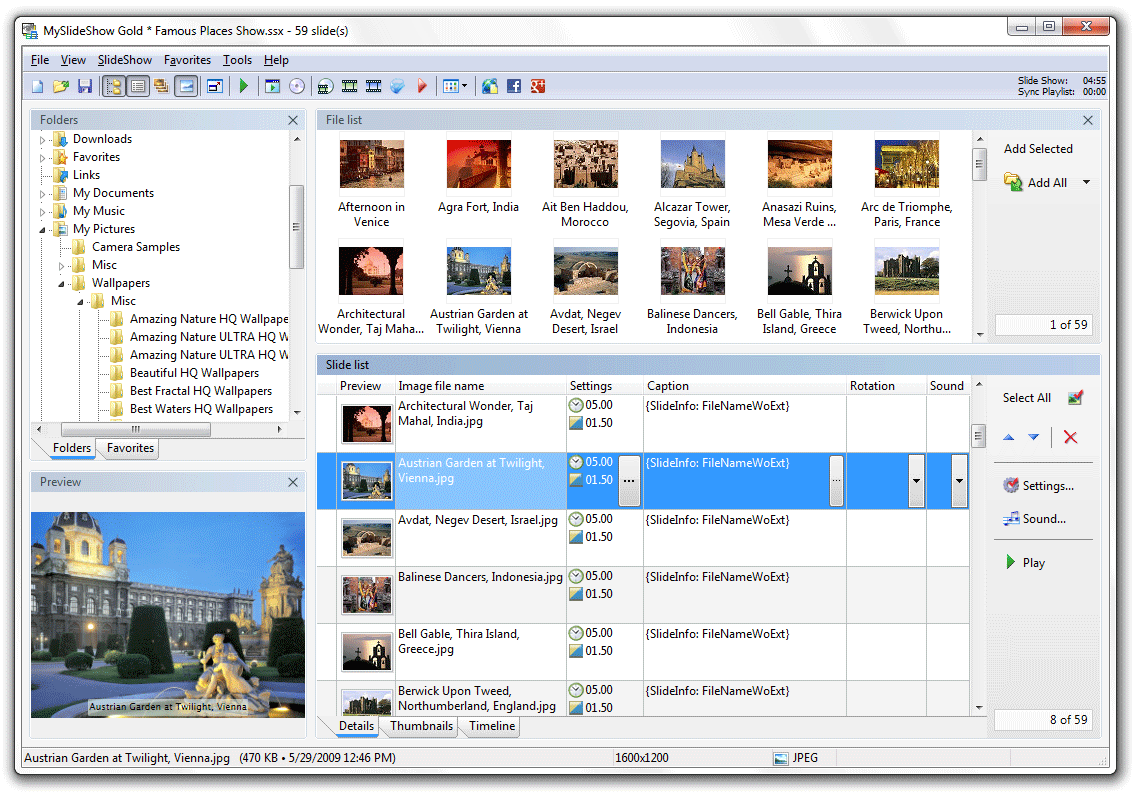
MySlideShow vi permetterà di creare e riprodurre slideshow sul vostro PC e sui lettori DVD.
Potrete visualizzare le vostre foto sotto forma di presentazione o thumbnails, combinare diversi slide show in un unico album, aggiungere didascalie, musiche di sottofondo ed effetti di transizione.
Create slideshow sotto forma di eseguibili standalone o file video, gallery HTML o Web gallery, masterizzateli sotto forma di dischi auto-avvianti per PC, Video CD o DVD e inviateli ai vostri amici.
Il programma è estremamente semplice da utilizzare, ha un'interfaccia molto chiara e pulita e vi permette di creare slideshow in pochi istanti, anche senza avere nessuna conoscenza nel campo della grafica, del montaggio video o della modifica delle fotografie.
Tutto sarà semplice, veloce ed automatico.
Ovviamente sarà presente la possibilità di riprodurre anche una canzone di sottofondo insieme alle vostre foto.
Potrete personalizzare qualsiasi aspetto del vostro slideshow grazie a questo ottimo programma.
Caratteristiche principali:
- Has a convenient user interface (similar to Windows Explorer) for adding image files to your slide show from your image folders.
- Shows selected images and slides in preview and full screen modes.
- Shows slides as thumbnails, which makes it easier to change their sequence or sort them.
- Allows you to customize various slide settings.
- Allows you to add and edit the slide Captions (you can use EXIF and IPTC tags there).
- Allows you to rotate your images to the position you want without an image editor.
- Allows you to change the settings either for the whole slide show or for individual slides.
- Allows you to synchronize slides with music.
- Allows you to allocate slides in your own transition points on the timeline of the special Sync Playlist using the Timeline Editor (only in Gold version).
- Allows you to place text, small images, web links, video clips and Flash animations on slides using the Slide Editor (only in Gold version).
- Offers Manual and Automatic slide show modes.
- Offers special Start Screen option allowing you to view your photos as Previews or Filmstrip.
- Saves slide show projects in special text format that allows you to play and edit them later on.
- Has font and color settings for the slide captions.
- Has font and color settings for the image information text.
- Plays background music during whole slide show from a special play list. Each track in the playlist can be customized with the Start Time, End Time, Fade In and Fade Out options.
- Plays narration or voice-over audio files (can be used together with background music).
- Supports Transition Effects.
- Supports Motion (Pan and Zoom) Effects for output video files (only in Gold version).
- Allows you to collect several executable slide shows into an Album.
- Creates output slide shows as standalone executable (.exe) files or screen savers.
- Creates output slide shows as video files and burns video CDs and DVDs.
- Generates HTML pages with thumbnails (web galleries) for publishing on the web.
- Can display a thumbnail/navigation panel during the slide show.
- Supports multi-monitor systems: slide show and thumbnail/navigation panel can be displayed on different monitors (for example, on the notebook screen and a projector if you make a presentation).
MySlideShow normalmente è a pagamento, ma solo per oggi potrete scaricarlo in modo completamente gratuito.
Istruzioni per usare il programma
Decomprimi lo zip che hai scaricato e installa il software. Leggi attentamente le istruzioni che trovi nel file reame.txt. Questo file è compreso in tutti i nostri download.
MySlideShow 3.5.6 è disponibile come Giveaway of the day! Hai 23 ore 58 minuti per scaricarlo e installarlo.
👉 Iscriviti al canale WhatsApp di YourLifeUpdated
Ricevi solo le notizie e le guide più importanti, senza spam.
Hai bisogno di aiuto o consigli rapidi?
💬 Supporto diretto: entra nel gruppo Telegram – CLICCA QUI
👥 In alternativa, unisciti al nostro Gruppo Facebook
🔥 Le migliori offerte tech, ogni giorno
💰 Unisciti al gruppo OFFERTE TECH (oltre 16.000 utenti)
Seleziono solo offerte davvero convenienti per farti risparmiare tempo e denaro.
Seguici anche qui:
📰 Google News o Facebook – per non perdere nessuna novità
🎥 YouTube – recensioni oneste, test e guide pratiche
💡 Vuoi risparmiare su Amazon?
🚀 Prova Amazon Prime gratis oppure
🛒 scopri le migliori offerte Amazon di oggi