Criptare file, documenti ed immagini da inviare su Internet
Criptare file, documenti ed immagini da inviare su InternetSe hai necessità di inviare dati sensibili su internet, dovresti codificarli prima. Ma, invece, dall'altra parte? Il ricevente probabilmente...
Criptare file, documenti ed immagini da inviare su Internet
Se hai necessità di inviare dati sensibili su internet, dovresti codificarli prima. Ma, invece, dall'altra parte? Il ricevente probabilmente non ama l'idea di comprare e imparare programmi per decodificare il tuo file. Nessun problema in questo caso, se stai utilizzando Silver Key.

Clicca con il destro il file o la cartella che desideri inviare e seleziona il comando "Create EXE Parcel". Silver Key comprime e codifica i tuoi dati e aggiunge un piccolo programma per decodificare. Il tuo corrispondente non deve installare nessun programma per decodificare, perché il pacchetto contiene tutti i programmi necessari.
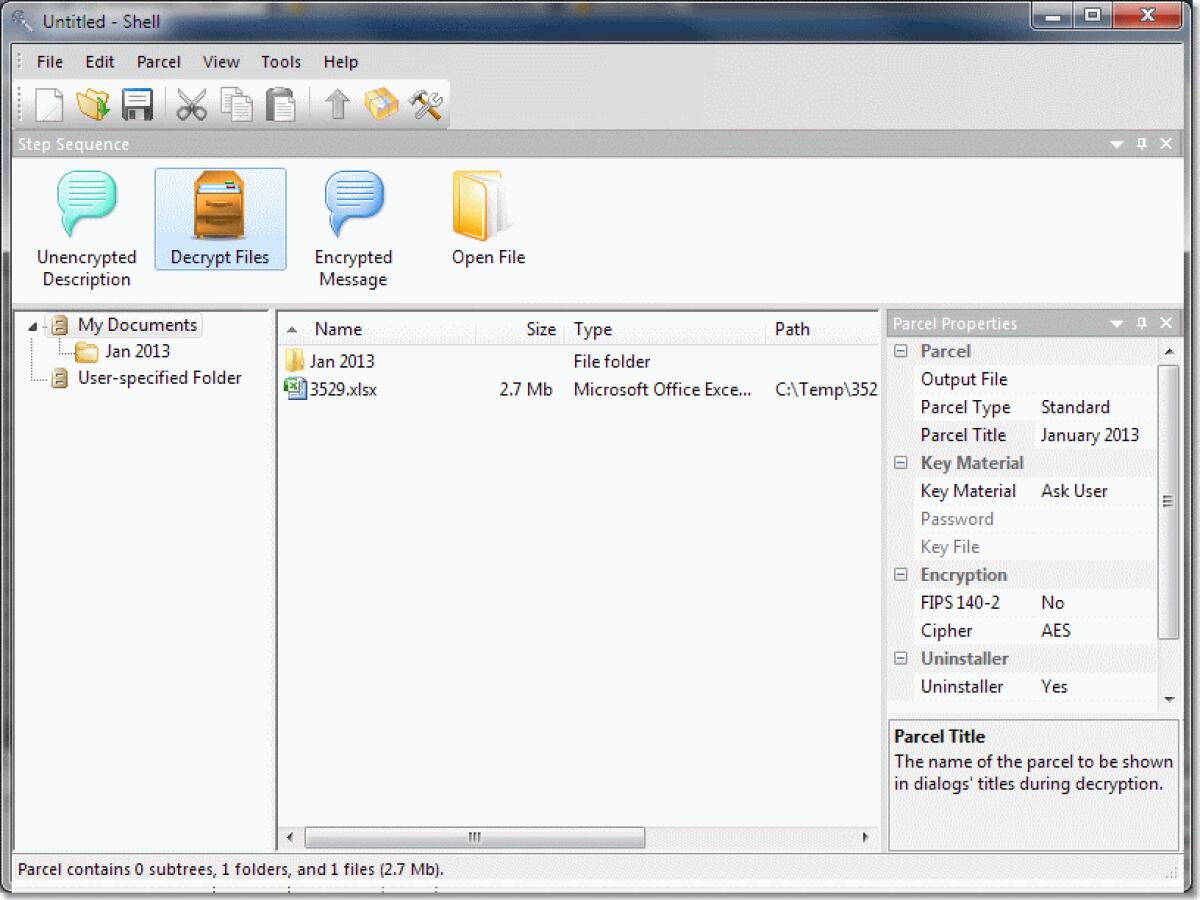
Se le tue richieste sono maggiori, puoi utilizzare Silver Key Parcel Designer per creare pacchetti codificati più avanzati. Puoi aggiungere commenti codificati e non codificati, creare scorciatoie sul computer di destinazione, richiedere l'apertura di un file dopo la codifica e persino includere un programma per disinstallare.
Il download include anche la versione USB portatile anche!
Features
- Ideal for Secure Data Transfer Silver Key encrypts sensitive data and creates encrypted parcel that can be safely sent over the Internet. Silver Key parcels can be self-extracting so the correspondent does not need to install any software to decrypt the data.
- Easy to Use Right-click a file or a folder and select ‘Create Parcel’. Silver Key will produce an encrypted file, which you can upload to an Internet server, send over your local network, or just attach to an email. Or better yet, select ‘Create Parcel and Upload’ and your encrypted file will be uploaded to Dropbox, Google Drive, or Onebox.
- Full Support for Web Drives Silver Key provides support for several popular Web-based drives - Google Drive, Microsoft OneDrive, and Dropbox. Using WebSilver component, you can exchange sensitive files with simple drag-and-drop - Silver Key will transparently encrypt and upload your data. Double-click the encrypted parcel and Silver Key will download and decrypt it back.
- HIPAA-compliant If you need to protect your data according to HIPAA privacy regulations, Silver Key provides effortless incorporation of HIPAA-compliant encryption into your existing data infrastructure.
- Strong Encryption Silver Key uses highly reputable Advanced Encryption Standard to protect user data, with its 256-bit encryption key far exceeding the HIPAA requirements. To strengthen security even further, Silver Key supports FIPS 140-2 compliant mode using FIPS-validated CryptoAPI encryption engine.
- Better Passwords Mistyped encryption passwords have likely killed more data than computer viruses. Silver Key uses a state-of-art password window that simplifies the process of password entering, and makes typing errors less likely to happen.
- Feature Rich If you want more than just encrypt a file, the Silver Key Parcel Designer is your tool. Use it to access the full power of Silver Key and create advanced parcels. You can add encrypted and unencrypted comments, create shortcuts on the target computer, and even include an uninstaller.
- Automated Processing The fully functional command-line interface lets you use Silver Key as a part of automated data processing system. Silver Key does not require a user desktop and can be used in unattended mode.
Solo per oggi, Silver Key Standard 4.9.0 è offerto gratuitamente.
Per usufruire dell’offerta dovete scaricare ed installare il programma cliccando sul link al fondo dell’articolo, dovete scompattate il file .ZIP, quindi avviare il file .EXE (se presente nel file) appena scaricato ed installate il programma seguendo la procedura di installazione guidata di Silver Key Standard 4.9.0 ed una volta completata l'installazione cliccate sul file di testo ReadMe.txt per sapere come ricevere la licenza gratuita in modo da attivare la versione completa di Silver Key Standard 4.9.0.
Potete scaricare Silver Key Standard 4.9.0 gratis cliccando sul seguente pulsante:
Download Silver Key Standard 4.9.0 Gratis
👉 Iscriviti al canale WhatsApp di YourLifeUpdated
Ricevi solo le notizie e le guide più importanti, senza spam.
Hai bisogno di aiuto o consigli rapidi?
💬 Supporto diretto: entra nel gruppo Telegram – CLICCA QUI
👥 In alternativa, unisciti al nostro Gruppo Facebook
🔥 Le migliori offerte tech, ogni giorno
💰 Unisciti al gruppo OFFERTE TECH (oltre 16.000 utenti)
Seleziono solo offerte davvero convenienti per farti risparmiare tempo e denaro.
Seguici anche qui:
📰 Google News o Facebook – per non perdere nessuna novità
🎥 YouTube – recensioni oneste, test e guide pratiche
💡 Vuoi risparmiare su Amazon?
🚀 Prova Amazon Prime gratis oppure
🛒 scopri le migliori offerte Amazon di oggi