Gestisci Tabelle Excel senza Excel
Gestisci Tabelle Excel senza ExcelI tool di ByteScout Spreadsheet aiutano nel lavoro con i documenti .xls, .xlsx, .csv e .odt editando, scrivendo e calcolando, lavorando con tabelle e molto altro. Non...
Gestisci Tabelle Excel senza Excel

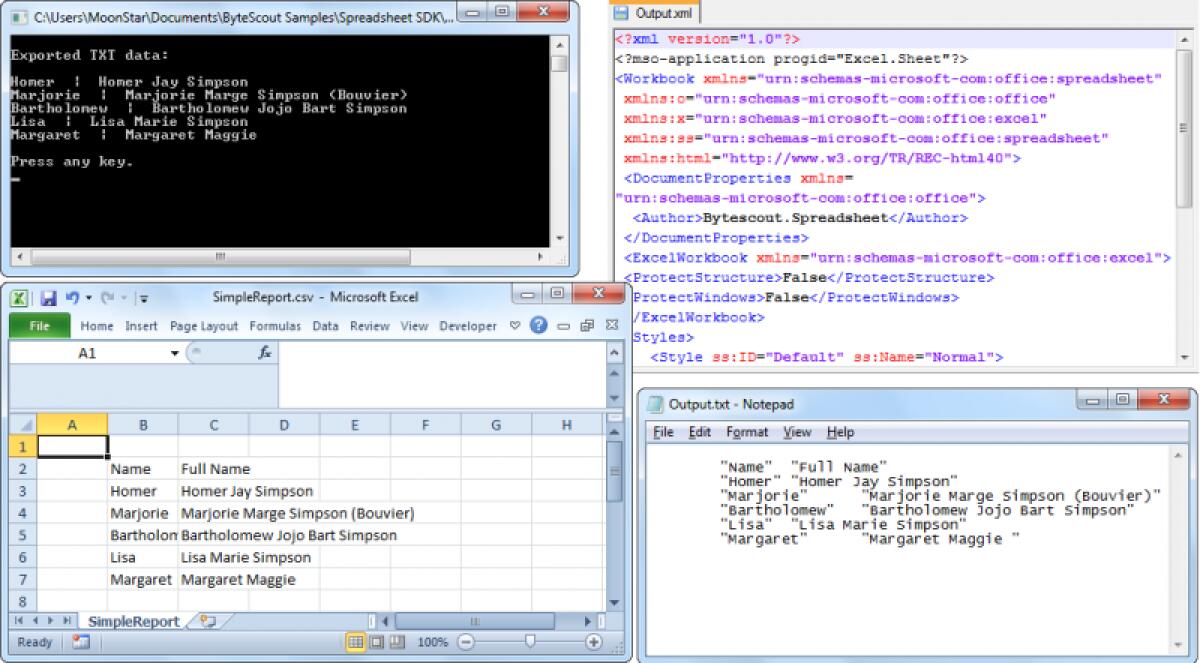
I tool di ByteScout Spreadsheet aiutano nel lavoro con i documenti .xls, .xlsx, .csv e .odt editando, scrivendo e calcolando, lavorando con tabelle e molto altro. Non hai necessità di installare nessun altro tool. Il programma funziona tranquillamente e indipendentemente. Utilizza la chiave di attivazione per eseguire la tua registrazione ed esegui il programma per finalità di lavoro.
Features
- Reads from CSV, XLS (Office 97-2010), XLSX (Office 2007-2010) and ODS (Open Office Calc);
- You can calculate any kind of information inside the Excel charts;
- You can work with tables and diagrams;
- You don’t need any other program or extension – the tool is complete;
- You can write and edit your .xls and .xlsx documents smoothly;
- Print Excel documents;
Ecco tutti i tutorials su come usare l'applicazione:
- Convert Excel to XML in C# and VB.NET
- Read Write Excel files in C# – sample source codes – Read from Excel File
- Excel calculation engine in VB.NET and C#
- VB.NET – Excel files importing tutorial
- Read XLS table .NET tutorial – C# sample
- Bulk CSV to SQL server tutorial – VB.NET and C# samples
- ASP.NET import from Excel – C# and VB samples for ASP.NET
- XLSX to CSV conversion tutorial – C# and VB.NET
- Read Excel with ASP.NET – C# source code
- How to import data from XLS to SQL in VB.NET or C#
- How to read dataset from XLS file in VB.NET
- How to export data from XLS spreadsheet to PDF file in C# with Spreadsheet SDK
- How to import data from list to XLS spreadsheet with Spreadsheet SDK
- How to import data from Jagged array to XLS spreadsheet with Spreadsheet SDK
- How to import data from DataSet to XLS spreadsheet with Spreadsheet SDK
- How to import data from Data Table to XLS spreadsheet with Spreadsheet SDK
- How to import data from 2D array to XLS spreadsheet with Spreadsheet SDK
- How to export data from XLS spreadsheet to list with Spreadsheet SDK
- How to export data from XLS spreadsheet to Jagged array with Spreadsheet SDK
- How to export data from XLS spreadsheet to DataSet with Spreadsheet SDK
- How to export data from XLS spreadsheet to Data Table with Spreadsheet SDK
- How to export data from XLS spreadsheet to 2D arrays with Spreadsheet SDK
- How to read CSV file using Bytescout Spreadsheet for .NET without Excel
- How to validate age of persons in existing spreadsheet and mark incorrect values with red color using Bytescout Spreadsheet for .NET
- Add worksheets in XLS documet, Get worksheet using its name, Access data within worksheet using Bytescout Spreadsheet SDK
- Convert XLS to SQL Server (via CSV BULK INSERT) using Bytescout Spreadsheet SDK
- Convert XLS to SQL Server using Bytescout Spreadsheet SDK
- Convert TXT file to SQL Server data using Bytescout Spreadsheet SDK
- Convert CSV file to SQL Server data using Bytescout Spreadsheet SDK
- Convert Spreadsheets from Command Line – Spreadsheet SDK Console Version
- Convert Spreadsheets from Command Line – Spreadsheet SDK Console Version
- Write formula into cell in XLS Excel document using Bytescout Spreadsheet SDK
- How to validate text in existing spreadsheet and mark incorrect values with red color using Bytescout Spreadsheet SDK
- How to validate birth dates in spreadsheet and mark incorrect birth dates with background color using Bytescout Spreadsheet for .NET
- How to set Shrink To Fit property for cell so Excel will automatically change font size to fit text in cell
- How to use rich formatting(font, color, style) while generating Excel(XLS) documents using Bytescout Spreadsheet SDK
- Number formats for cells in spreadsheets generates using Bytescout Spreadsheet SDK for .NET library
- How to format date time in cell in spreadsheet using Bytescout Spreadsheet for .NET
- Set alignment for cell in Excel XLS document using Bytescout Spreadsheet SDK
- Set active worksheet selected by default in generated spreadsheet document written with Bytescout Spreadsheet SDK for .NET
- Add worksheets in XLS documet, Get worksheet using its name, Access data within worksheet using Bytescout Spreadsheet SDK
- How to rename worksheet in existing spreadsheet using Bytescout Spreadsheet for .NET
- Remove rows with data from existing Excel (.XLS) document using Bytescout Spreadsheet SDK – Sample source code
- Sample: Remove columns from existing Excel (.XLS) document using Bytescout Spreadsheet SDK
- How to read cells from XLSX (Excel 2007 spreadsheet) document using Bytescout Spreadsheet for .NET
- How to read ODS Open Office Calc spreadsheet document using Bytescout Spreadsheet for .NET
- How to read date values from cells in existing XLS document using Bytescout Spreadsheet for .NET
- Read data from existing Excel(XLS) document into dataset using Bytescout Spreadsheet SDK
- How to add rows to an existing Excel (XLS) document using Bytescout Spreadsheet SDK
- Adding new columns to an existing Excel XLS document using Bytescout Spreadsheet SDK
- Generate XLS document from ASP.NET application using Bytescout.XLS library for .NET
- Write XLS documents in Visual Basic.NET using Bytescout Spreadsheet SDK
- Write XLS documents from C# using Bytescout Spreadsheet SDK for .NET
- Generate XLS document from ASP.NET using Bytescout Spreadsheet SDK
- How to use different line styles for cell formatting while generating XLS document with Bytescout Spreadsheet SDK for .NET
- How to use different fonts for cells in spreadsheets made with Bytescout Spreadsheet for .NET
- Create XLS Excel document report with a table using Bytescout Spreadsheet SDK
- How to convert Excel (XLS) document into text (.TXT) file using Bytescout Spreadsheet SDK
- How to convert Excel (XLS) document into CSV file using Bytescout Spreadsheet SDK
- Convert XLS Excel document into XML format using Bytescout Spreadsheet SDK
- Convert XLS Excel document into HTML report using Bytescout Spreadsheet SDK
- How to change cell value in existing XLS document using Bytescout Spreadsheet
Solo per oggi, Spreadsheet Tool 2.0.0 è offerto gratuitamente.
Per usufruire dell’offerta dovete scaricare ed installare il programma cliccando sul link al fondo dell’articolo, dovete scompattate il file .ZIP, quindi avviare il file .EXE (se presente nel file) appena scaricato ed installate il programma seguendo la procedura di installazione guidata di Spreadsheet Tool 2.0.0 ed una volta completata l'installazione cliccate sul file di testo ReadMe.txt per sapere come ricevere la licenza gratuita in modo da attivare la versione completa di Spreadsheet Tool 2.0.0.
Potete scaricare Spreadsheet Tool 2.0.0 gratis cliccando sul seguente pulsante:
Download Spreadsheet Tool 2.0.0 Gratis
👉 Iscriviti al canale WhatsApp di YourLifeUpdated
Ricevi solo le notizie e le guide più importanti, senza spam.
Hai bisogno di aiuto o consigli rapidi?
💬 Supporto diretto: entra nel gruppo Telegram – CLICCA QUI
👥 In alternativa, unisciti al nostro Gruppo Facebook
🔥 Le migliori offerte tech, ogni giorno
💰 Unisciti al gruppo OFFERTE TECH (oltre 16.000 utenti)
Seleziono solo offerte davvero convenienti per farti risparmiare tempo e denaro.
Seguici anche qui:
📰 Google News o Facebook – per non perdere nessuna novità
🎥 YouTube – recensioni oneste, test e guide pratiche
💡 Vuoi risparmiare su Amazon?
🚀 Prova Amazon Prime gratis oppure
🛒 scopri le migliori offerte Amazon di oggi