Screenshot e Screenrecorder su Windows senza installare nulla
SnapaShot è un programma che ho scoperto di recente leggerissimo e veloce che permette di registrare lo schermo e scattare screenshot sul vostro PC Windows. Il programma, disponibile in versione porta...
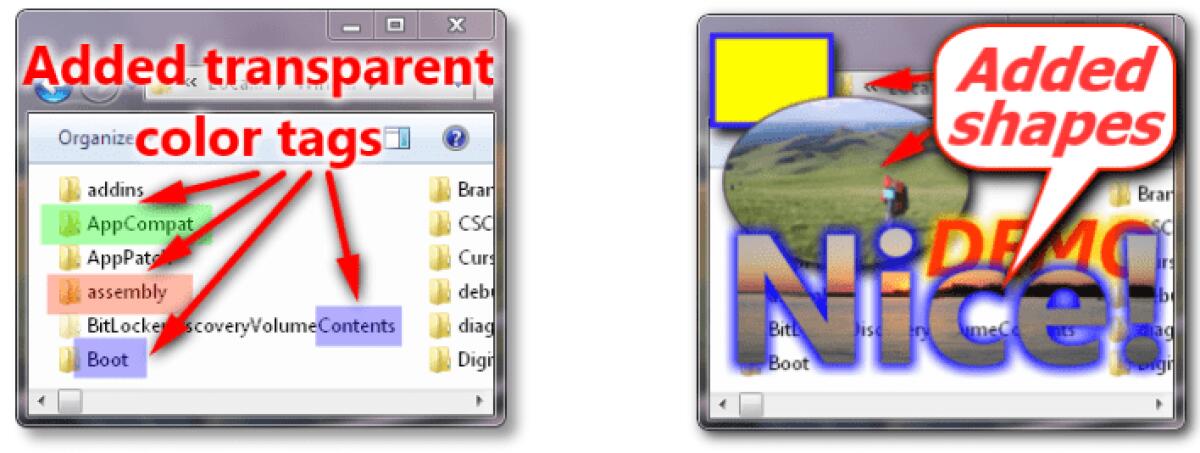

SnapaShot è un programma che ho scoperto di recente leggerissimo e veloce che permette di registrare lo schermo e scattare screenshot sul vostro PC Windows. Il programma, disponibile in versione portable, ed è in grado di catturare qualsiasi cosa si vedete sul vostro schermo come finestre, menu, cursore, video, programmi, immagini, ecc. Una volta catturato sarà possibile fare alcune modifiche come cambiare la luminosità, il contrasto e la nitidezza dell'immagine ma anche aggiungere cornici, effetti e testo alle vostre foto. Il programma è leggero e potrete anche portarlo sulla vostra chiavetta USB visto che non dovete installarlo. Infine il tasto Copy infine copierà lo screenshot appena fatto, permettendoci di incollarlo dove vogliamo oppure con il tasto Save to file ci farà salvare invece lo screen in diversi formati (jpeg, png ecc.).
Features
- SnapaShot is the easiest and quickest way to capture screen!
- You don't need to install it, just download portable archive and use Snapa anywhere
- SnapaShot is only 106 Kb (only one file)
- You can cut variable sized snapshots from any web pages, photos and online videos
- SnapaShot save snaps in 5 graphic formats
- SnapaShot is free screen capture software
PRO additional features
- You get full screenshot quality control
- You get the ability to change brightness and contrast of screenshot
- Printing, Drag and Drop support
- You can add border, watermark, frames, lines, arrows, images, notes and text on screenshot or any file with image
- You can use visual effects for shapes, text, border, watermark
- SnapaShot PRO is only 700 Kb (only one file, don't need to install if use portable archive)
- We provide lifetime support and feedback for all our products
- You can use screen capture software SnapaShot PRO and SnapaShot PRO Classic versions with one registration key
Tips & Tricks: - You can use several SnapaShot PRO in one time (Options -> Allow to run several SnapaShots)
- You can open any image file in SnapaShot PRO - simple drag and drop the file on SnapaShot border
- SnapaShots PRO window border can be hidden if SnapaShot has lost the focus
Potete scaricare gratuitamente SnapaShot per Windows in versione portable
Download ultima versione SnapaShot
👉 Iscriviti al canale WhatsApp di YourLifeUpdated
Ricevi solo le notizie e le guide più importanti, senza spam.
Hai bisogno di aiuto o consigli rapidi?
💬 Supporto diretto: entra nel gruppo Telegram – CLICCA QUI
👥 In alternativa, unisciti al nostro Gruppo Facebook
🔥 Le migliori offerte tech, ogni giorno
💰 Unisciti al gruppo OFFERTE TECH (oltre 16.000 utenti)
Seleziono solo offerte davvero convenienti per farti risparmiare tempo e denaro.
Seguici anche qui:
📰 Google News o Facebook – per non perdere nessuna novità
🎥 YouTube – recensioni oneste, test e guide pratiche
💡 Vuoi risparmiare su Amazon?
🚀 Prova Amazon Prime gratis oppure
🛒 scopri le migliori offerte Amazon di oggi