Windows 10 PE Live USB: Provare Windows 10 da USB senza installare nulla
Da quando Windows 10 è diventato ufficiale in tanti lo hanno installato, ma in tanti altri hanno paura ad aggiornare dal caro e vecchio Windows 7 perchè non vogliono veder stavolta le loro abitudini i...
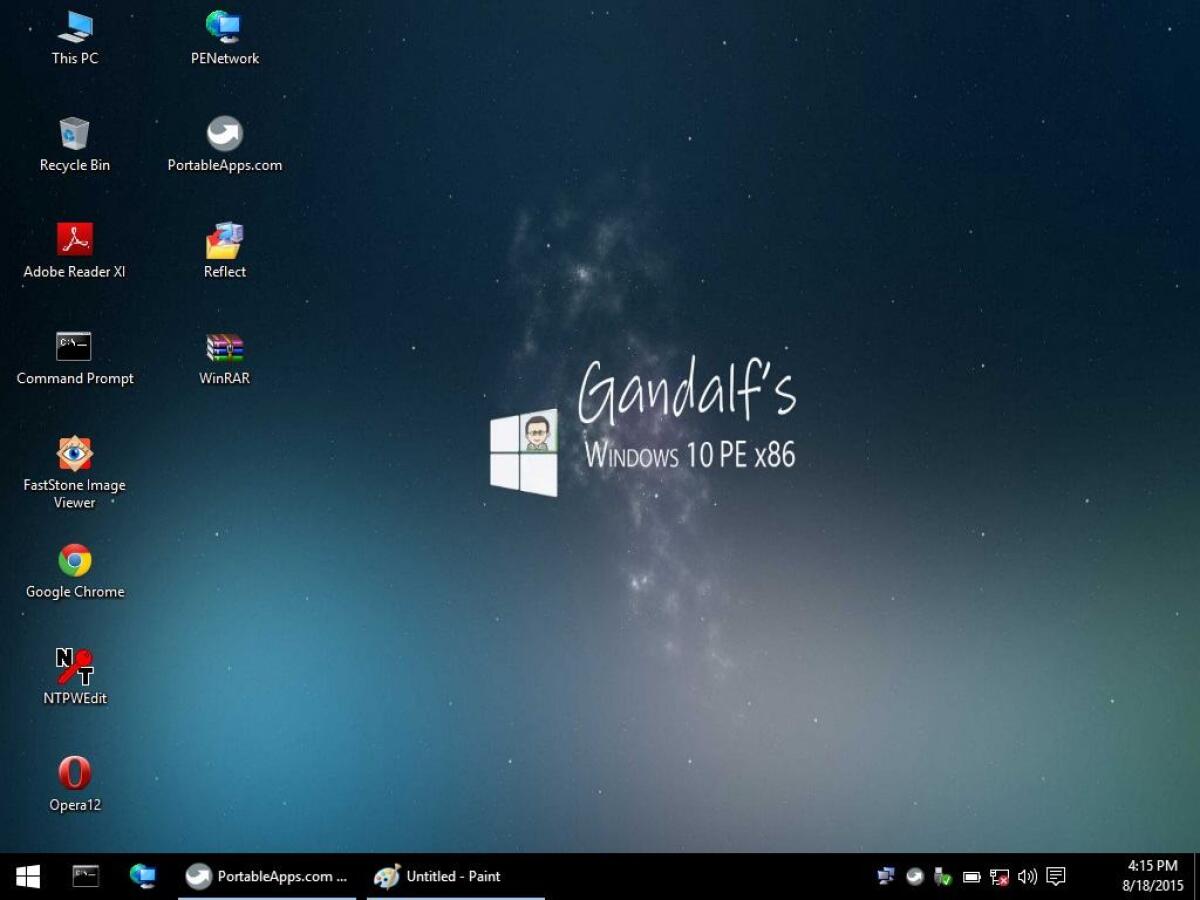

Da quando Windows 10 è diventato ufficiale in tanti lo hanno installato, ma in tanti altri hanno paura ad aggiornare dal caro e vecchio Windows 7 perchè non vogliono veder stavolta le loro abitudini informatiche. Ecco che per provare Windows 10 senza installare nulla esistono due possibilità:
- Utilizzare una macchina virtuale
- Avviare Windows 10 da una chiavetta USB, le cosiddette edizioni Live
Ecco che in rete esiste una particolare versione di Windows 10 che è avviabile da USB utile sia per le emergenze che per provare Windows 10 in tutta sicurezza e vedere se fa per noi.
In questa ISO sono stati aggiunti i seguenti programmi
- Google Chrome Popular web browser
- Internet Explorer Microsoft’s web browser
- 7Zip Archiver and archive manager
- MBR Fix Fix master boot record errors
- Clamwin Antivirus Free Antivirus program
- Filezilla FTP FTP client
- Regshot Registry compare utility that allows you to take a snapshot of your registry
- Easy BCD Take control of your boot loader
- Process Hacker Open source process viewer
- Defraggler Disk Defragmenter
- Process Monitor Monitoring tool that shows real-time file system, Registry, and process or thread activity
- Process Explorer Information about which handles and DLLs processes have opened or loaded
- Tree Size TreeSize tells you where precious space has gone to
- Irfan View Fast and compact image viewer/converter.
- Winrar Powerful archiver and archive manager
- Virtual Keyboard On Screen keyboard
- VLC Media Player
- Rufus Create bootable USB drives the easy way
- MS Paint and Worpad Microsoft’s basic image and test editors
- MalwareBytes Detects and removes dangerous malware
- Team Viewer Remote control, desktop sharing & file transfer
- Macrium Reflect Backup and disk imaging solution
- FastStone Image Viewer Fast, stable, user-friendly image browser, converter & editor
- CCleaner System optimization, privacy and cleaning tool
- Adobe Reader
- Firefox Portable Mozilla Firefox
- Ammyy Admin Desktop sharing &remote connections
- Aomei Partition Assistant Disk Partition Creator And Editor
- HWiNFO Hardware information and diagnostic tool
- Media player classic Classic Windows media player
- Disk Wipe Erase all disk data and prevent recovery of data.
- Smart Partition Recovery Lose a drive? Smart Partition Recovery will restore it!
- Easy Recovery Data recovery software that allows you to recover lost, deleted, and formatted data
- Wise Data Recover Recovery tool to recover deleted files
- Active Disk Imager Disk image software that makes an exact copy of any PC disks
- Active Partition Manager Manage storage devices and the logical drives or partitions
- Active Undelete Data recovery software that allows you to recover lost, deleted, and formatted data
- MyLan Viewer Netbios & LAN/Network IP address scanner
- Wordpad Basic document editor
- Snipping Tool Screenshot captures
Requisiti minimi
- Processore Intel Pentium 4 o AMD Athlon 64
- 2 Gb di RAM
- Supporto USB Minimo 4 Gb
Potete scaricare Windows 10 da avviare direttamente da una chiavetta USB cercando sul Google la seguente chiave di ricerca
Microsoft Windows 10 PE Live USB
👉 Iscriviti al canale WhatsApp di YourLifeUpdated
Ricevi solo le notizie e le guide più importanti, senza spam.
Hai bisogno di aiuto o consigli rapidi?
💬 Supporto diretto: entra nel gruppo Telegram – CLICCA QUI
👥 In alternativa, unisciti al nostro Gruppo Facebook
🔥 Le migliori offerte tech, ogni giorno
💰 Unisciti al gruppo OFFERTE TECH (oltre 16.000 utenti)
Seleziono solo offerte davvero convenienti per farti risparmiare tempo e denaro.
Seguici anche qui:
📰 Google News o Facebook – per non perdere nessuna novità
🎥 YouTube – recensioni oneste, test e guide pratiche
💡 Vuoi risparmiare su Amazon?
🚀 Prova Amazon Prime gratis oppure
🛒 scopri le migliori offerte Amazon di oggi